Admin renomination
Access Gateway supports the process of nominating a new admin node. The new admin node replaces the original admin node and contains all the configuration. However, it can only run the latest version of Access Gateway.
Admin renomination allows:
- Replacing the admin instance with a new instance running the latest version of Access Gateway without service interruption.
- Administrators to roll back to a previous admin instance in any situation where an update failed.
In general, admin renomination requires the following tasks:
- Nominate the worker - Select a worker node to become the new admin node. This worker is typically a newly added worker node and should be running the latest version of Access Gateway. This can be done by either a prior upgrade to the latest version or being added to the cluster as a new member running the latest version. Nominating a new worker as admin that is not running the latest version of Access Gateway is possible but not considered as best practice.
Note:
In instances where, for access/management or other purposes, the admin node is in a different network zone then workers, the worker targeted to become the new admin should be moved into the same network zone as the admin.
If a new instance is being added, then add this instance in the same network zone as the current admin.
- Approve renomination - This step involves accessing the admin and worker nodes and starting the renomination process.
- Perform post renomination tasks - This step involves replacing the existing admin DNS entry with the IP address of the newly nominated admin node and possibly updating the load balancer routing.
After the process is complete, the nominated worker node takes over with the existing admin node still being available, but as a standalone instance. Afterward you can retire the original admin node or return it to the cluster as a worker.
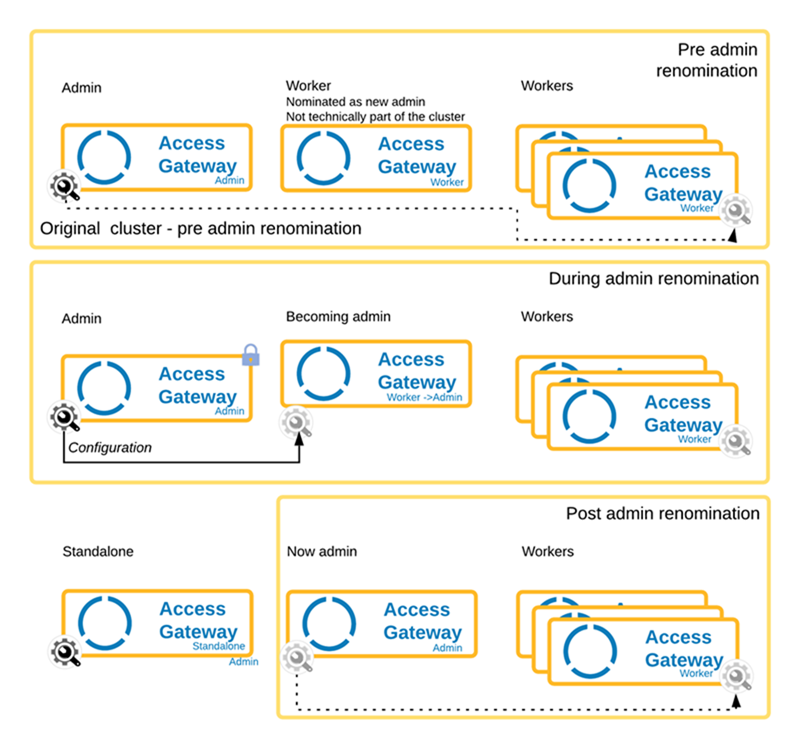
Before beginning the admin renomination process, ensure that the current admin node is not in use by a load balancer and not servicing request. After the renomination process completes, the existing admin node becomes standalone and will no longer receive cluster updates. Not including the original admin in the load balancer rotation ensures no loss of service during the renomination process.
The following sequence diagram describes the process at a high level.
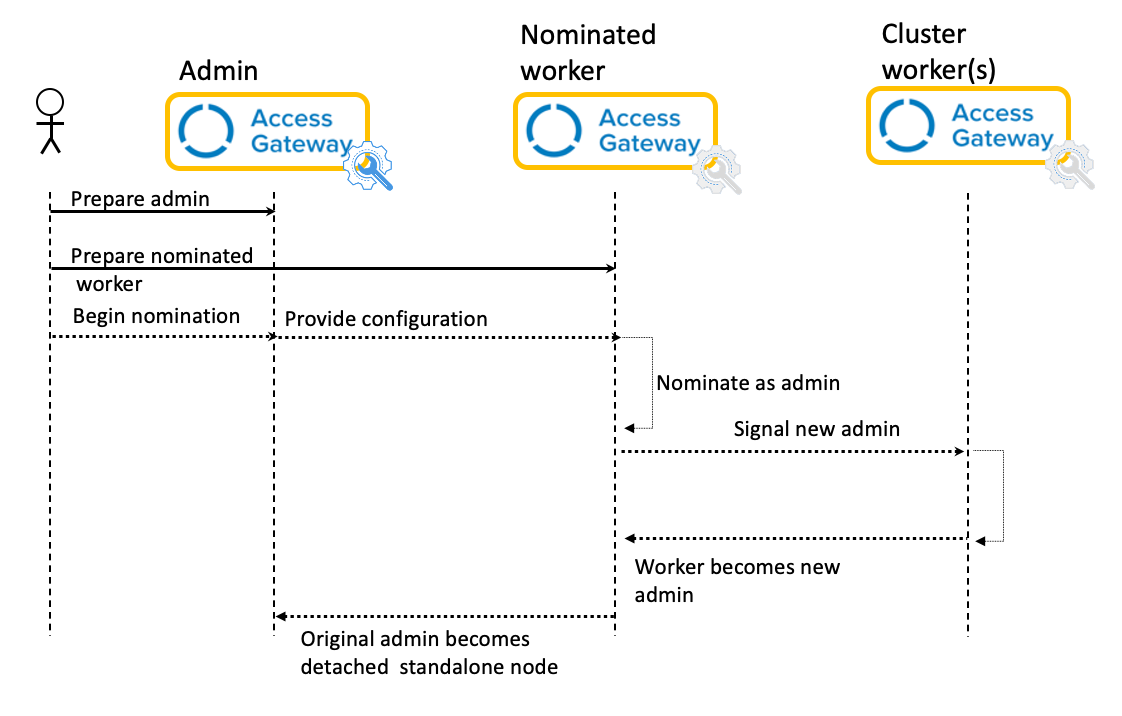
After the admin renomination process completes, the nominated worker node then becomes the new admin node. You must enter the IP address of this new admin node into DNS in order to access the Access Gateway Admin UI console.
The original admin node may then be decommissioned or returned to service as a worker.
Related topics